🦶 Foot Insert
📌 What
A standalone foot insert that plugs into any HomeRacker connector arm from the outside. Replaces the former built-in is_foot connector option with a separate, modular component.
🤔 Why
- Flexibility: Feet are now independent — add or remove them without needing special connector variants. When extending a rack vertically, just unmount the feet and add levels to the bottom.
- Simplicity: Removes
is_footcomplexity from the connector module (fewer variants to maintain and export). - Material choice: Can be printed in TPU for better grip and load distribution, while the connector stays rigid (PLA/PETG).
🔧 How
Open parts/foot.scad in OpenSCAD and use the Customizer panel.
| Parameter | Default | Description |
|---|---|---|
debug_colors |
false |
Show distinct colors per section for visualization |
disable_chamfer |
false |
Remove chamfers from all sections |
anchor |
CENTER |
BOSL2 anchor point for positioning |
spin |
0 |
BOSL2 spin rotation (degrees) |
orient |
UP |
BOSL2 orientation vector |
Geometry
Three stacked parts (top → bottom, using BOSL2 attach()):
- Support section (15×15×15mm): A 1-unit
support()withx_holes=true, oriented downward. Plugs into the connector arm with lock pin holes in both perpendicular directions. - Spacer (15×15×1.1mm): Inset shim at the arm entry —
TOLERANCE/2shift-out plusBASE_CHAMFERinset for a flush transition. Chamfered on side edges. - Base plate (19.2×19.2×2mm): Wider platform for load distribution and grip. Chamfered on all edges except the top face.
Usage
include <foot/lib/foot.scad>

// Default foot
foot();

// Debug visualization
foot(debug_colors=true);

// Flat base (no chamfer)
foot(disable_chamfer=true);
📸 Catalog
| Part | Preview |
|---|---|
| Foot | 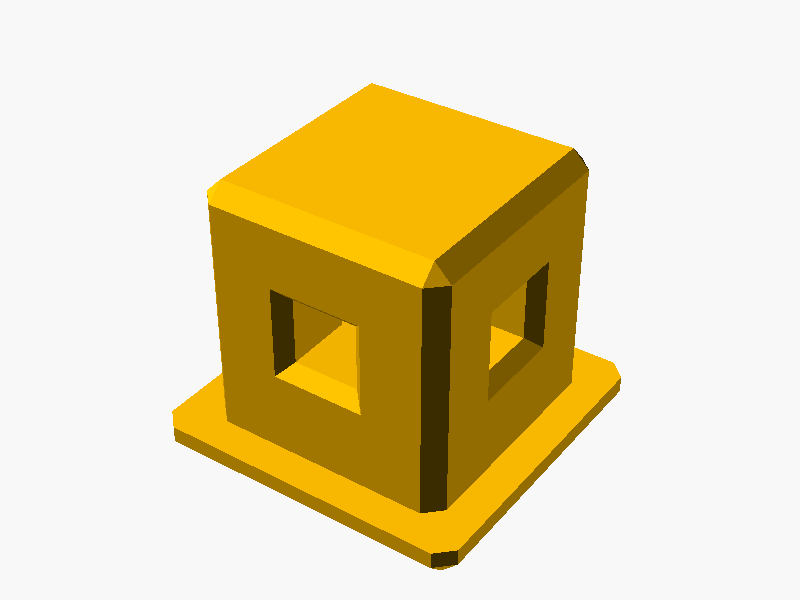 |
To generate or refresh previews:
./cmd/export/export-png.sh models/foot/parts/foot.scad
📚 References
- HomeRacker core — connectors, supports, lock pins
- Connector module — the connector arms where feet insert